
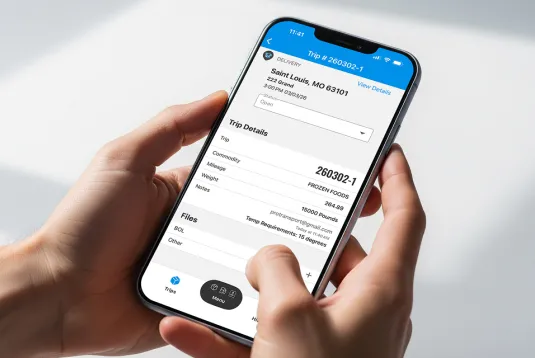
When a driver's on the road, it can be difficult to keep dispatchers in the know and provide load documents for back-office staff, which can lead to miscommunication and slower workflows. Thankfully, there's an all-in-one solution for these challenges: the ProTransport Driver Mobile App!
Continue reading to learn about how this feature works for drivers and office staff, along with several key advantages you can look forward to.
How the Driver Mobile App Works
ProTransport Enterprise customers have access to the Driver Mobile App, a feature that benefits everyone from drivers and dispatchers to back-office staff. Drivers can easily access this feature on their phones within the RTS app, helping them stay connected while on the road. Teams in the office using the web version of ProTransport Enterprise will automatically receive updates and information from their drivers.
This seamless driver-to-office connection greatly improves operational efficiency and visibility.
Streamlined Load Tracking and Status Updates
Rather than chasing status updates through texts and phone calls, drivers can simply update the trip status right within the Driver Mobile App. They'll have the ability to select from these options:
- In Transit
- Arrived at Shipper/Receiver
- Loaded/Unloaded
- Delayed
- Departed Shipper
- Delivered
When a driver updates the trip status in the Driver Mobile App, the dispatcher back at the office will see the update instantly reflected on the Dispatch Board, eliminating the need for manual entry.
Improved Visibility Into Loads and Trips
Drivers already have a lot to keep track of when they're on the road. The Driver Mobile App makes their life easier by giving them quick access to all the details they need, when they need them.
Drivers can view important information like active trips, upcoming loads and load history all in one place. To ensure everyone's on the same page, drivers have access to detailed load information and instructions. Plus, they'll receive helpful trip assignment alerts in the app and through push notifications, so they always know what's coming up next!
Easy Document Management
Paperwork shouldn't slow down drivers or delay back-office tasks. With the Driver Mobile App, managing and storing load documents is straightforward, fast and entirely mobile.
Drivers can take a picture of important load documents and upload them directly to the trucking mobile app, avoiding the need to scan or email paperwork after delivery. The best part is that every document is automatically attached to the correct load, giving office staff immediate visibility and reducing errors. With the click of a couple of buttons, drivers can submit paperwork like:
- Bills of Lading (BOLs)
- Proof of Delivery (PODs)
- Lumper Receipts
- Other load-related documents!
Get the Trucking App Designed for Real-World Workflows
Ready to take advantage of accurate load tracking, immediate status updates and mobile-friendly document management? Then count on the Driver Mobile App within ProTransport Enterprise! If you'd like to see this feature in action, schedule a demo with our friendly experts today.